Most Magento 2 stores fail Google’s Core Web Vitals on mobile. We built a Laravel 12 + React 19 storefront that passes them — on a live catalog with 80,000+ products — without replacing Magento or migrating a single row of data. Here’s a deep dive into the architecture behind it.
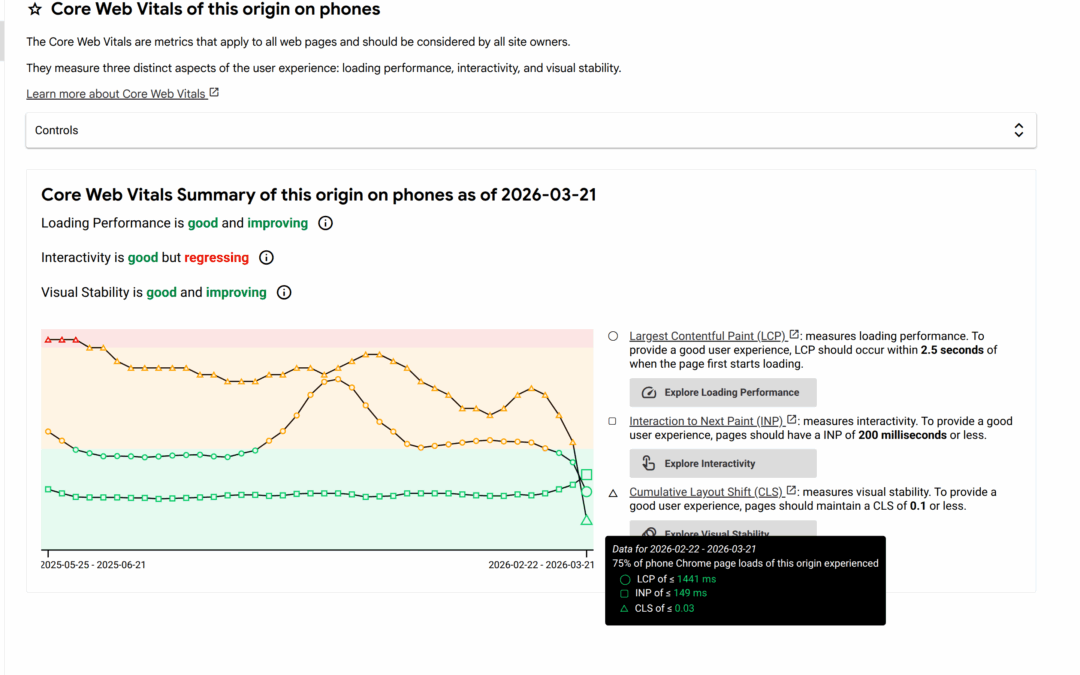
Results at a glance (real CrUX field data, mobile, p75):
- LCP dropped from ~3.5s to 1.2s — 66% faster
- Google Core Web Vitals assessment: Failed → Passed
- 80,000+ SKU production catalog with complex vehicle fitment data
- Zero-downtime deployments via blue/green on AWS
- All index changes propagate in 10–30 seconds, not minutes
The Magento 2 Performance Problem Nobody Wants to Talk About
Magento 2 is the most feature-rich open-source ecommerce platform on the market. It handles complex catalogs, multi-store configurations, B2B workflows, and ERP integrations better than anything else in its class.
But if your Magento 2 store is slow on mobile, you’re not alone.
Even with full-page cache, Varnish, and Redis in place, the moment a customer interacts with the catalog — filtering products, searching, or adding to cart — they hit the full Magento request cycle. Every product listing page query round-trips through the ORM, reloads Elasticsearch results back through MySQL for hydration, and renders through the Magento layout XML system. For stores with tens of thousands of SKUs, this means 3–6 second page loads on mobile are the norm, not the exception.
The numbers bear this out across the ecosystem:
| Metric | Typical Magento 2 Store (Mobile) | Industry “Good” Threshold |
|---|---|---|
| Largest Contentful Paint (LCP) | 3.5–6.0s | < 2.5s |
| Interaction to Next Paint (INP) | 300–500ms | < 200ms |
| Time to First Byte (TTFB) | 1.5–3.0s | < 800ms |
Google’s Core Web Vitals directly influence search rankings. Most Magento 2 stores fail them on mobile.
We decided to fix this — not by replacing Magento, but by rethinking what the storefront needs to be.
The Architecture: Keep Magento, Replace the Frontend
Lightning is a decoupled Magento storefront where Magento 2 continues to handle everything it’s great at — product management, order processing, ERP integration, promotions, admin workflows — while a purpose-built Laravel 12 + React 19 frontend handles the customer-facing experience.
How It Works
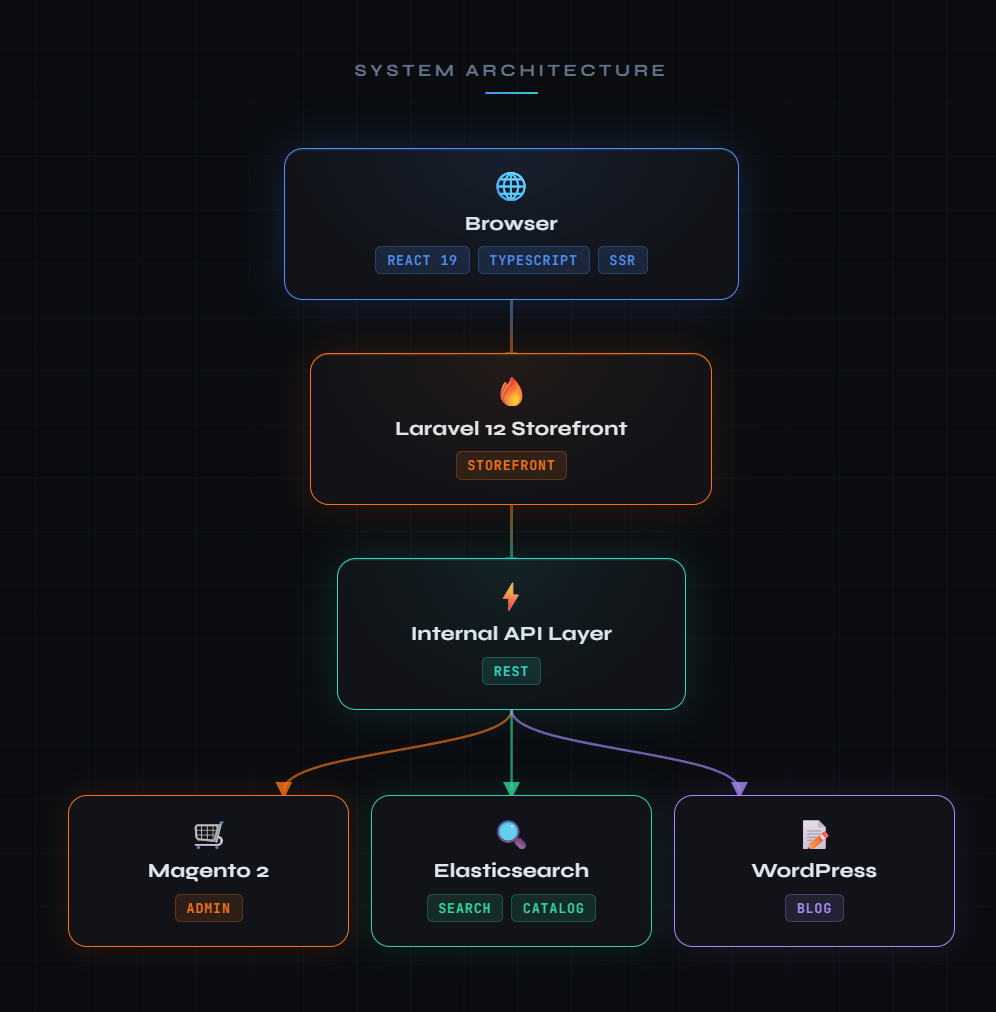
The key insight: the storefront doesn’t need Magento’s layout engine, block system, or collection queries. It needs data — products, prices, inventory, customer sessions, cart state. An internal API layer connects Laravel to Magento’s business logic directly, bypassing the entire frontend rendering pipeline.
The result is a storefront that behaves like a modern SPA — instant page transitions via Inertia.js, server-side rendering for SEO, and React components that hydrate in milliseconds — while Magento handles the heavy lifting behind the scenes.
Lightning works with your existing Magento instance!
This is not a re-platforming project. Clients keep their existing Magento 2 instance — all product data, customer accounts, order history, and admin workflows remain in place. Lightning adds an optimized module layer for indexing and cart integration, but no existing functionality is removed or replaced. The Magento admin panel continues to function exactly as it does today.
There is no data migration. No re-importing catalogs. No rebuilding custom integrations. Your team doesn’t need to learn a new backend system.
Already running Magento 2? Lightning wraps around your existing setup. See how it works for your store by contacting us.
How We Eliminated the MySQL Bottleneck in Magento Search
Standard Magento 2 uses Elasticsearch through an adapter layer that, paradoxically, reloads every search result back into MySQL before rendering. Here’s the default flow:
Before: Magento’s Default Search Flow (6 steps)
Customer searches a terms such as “black wheels 20 inch”
- Magento sends query to Elasticsearch
- ES returns matching product IDs
- Magento reloads those IDs through the ORM collection
- ORM joins against catalog EAV tables (prices, attributes, stock)
- Magento applies collection filters and sorting
- Magento renders the page through layout XML
That MySQL round-trip is the bottleneck. For a catalog with 80,000+ products and complex data relationships, it adds hundreds of milliseconds to every listing page request — often more.
After: Lightning’s Search Flow (4 steps)
Customer searches “black wheels 20 inch”
- Laravel sends query directly to Elasticsearch
- ES returns fully hydrated product documents
- Laravel passes data to React via Inertia
- React renders the page
No MySQL round-trip. No ORM hydration. No layout XML. The Elasticsearch response contains everything the frontend needs to render a complete product card — name, price, images, stock status, and even vehicle-specific fitment compatibility.
Bottom line: Lightning delivers search and listing page response times comparable to stores using the Algolia extension — which can cost thousands per month at scale — using self-hosted Elasticsearch at a fraction of the cost.
See it for yourself on Element Wheels.
Near-Real-Time Indexing
For large Magento 2 catalogs, the recommended approach is to run indexers in scheduled mode, where changes are batched and processed on a recurring cron cycle. In practice, the processing time for large catalogs means changes can take minutes to appear on the storefront. For flash sales, inventory-sensitive operations, or dynamic pricing, this delay is unacceptable.
Lightning replaces the scheduled model with an event-driven indexing pipeline. When a product is saved, a price changes, or stock is updated, the system detects the change and queues an index operation immediately. Changes propagate to the live Elasticsearch index within 10–30 seconds — not minutes.
10–30 seconds. That’s how long it takes for a price change in the Magento admin to appear on the live storefront.
For large-scale operations like CSV imports (a daily workflow for many merchants), the system uses intelligent batching with deferred cascade logic. A 5,000-row CSV import doesn’t trigger 5,000 individual reindex operations. Instead, changes are accumulated, deduplicated, and flushed in optimized batches with a single index refresh at the end.
Optimized for Large Catalogs
The indexing architecture is specifically designed for stores with tens of thousands of SKUs. Key optimizations include:
- Parallel reindexing — Full catalog reindex operations are split across multiple workers, processing products in parallel rather than sequentially
- Per-product granularity — Individual products can be reindexed without touching the rest of the catalog, using targeted commands rather than full index rebuilds
- Cascade intelligence — When a child product changes (e.g., a specific wheel size), only its parent listing is reindexed — not the entire catalog
- Source field optimization — Large data fields used only for filtering are indexed but excluded from document retrieval, keeping response payloads lean
Standard Magento stores often resort to running indexer:reindex on a cron job — a blunt instrument that can take hours for large catalogs and takes the search index offline during the rebuild. Lightning’s targeted approach means the index is always live, always current, and never offline.
Zero Downtime Deployments: No More Maintenance Windows
Every deployment to the Lightning stack is a blue/green deployment on AWS infrastructure. Here’s what that means in practice:
- A new release is built alongside the running production environment — not in place of it
- Both the old and new versions run simultaneously during the transition
- Traffic is atomically switched from the old release to the new one
- The old release remains available for instant rollback if needed
This applies to both the Laravel storefront and the Magento backend. Magento deployments — which traditionally require maintenance mode for setup:upgrade — are coordinated so that database migrations complete without any customer-facing downtime. No 503 pages. No “we’ll be right back” screens.
The two applications (Laravel and Magento) can even be deployed independently. A frontend-only change doesn’t require redeploying Magento, and a Magento admin fix doesn’t require rebuilding the storefront. This decoupling means faster iteration cycles and smaller blast radii for changes.
Deployments are triggered automatically via GitHub Actions on merge to the main branch. The entire pipeline — build, deploy, health check, cutover — typically completes in a few minutes.
WordPress-Powered Blog, React-Powered Experience
Content marketing is critical for ecommerce SEO, but Magento’s built-in CMS is limited and its blog extensions are universally mediocre. Lightning takes a different approach: WordPress handles content creation, Laravel handles content delivery.
Blog posts are authored in WordPress’s familiar editor — the same tool that powers 40%+ of the web. The Laravel storefront reads directly from the WordPress database, caches content intelligently, and renders it through the same React component system used for the rest of the site. The result is a blog that:
- Loads as fast as any other page on the site (same sub-1.5s LCP)
- Shares the site’s navigation, header, footer, and design system
- Supports all of WordPress’s content features (categories, tags, featured images, custom fields)
- Requires zero WordPress theme development — the React frontend is the theme
Content editors work in an interface they already know. Developers never touch WordPress PHP. Everyone wins.
Ship Features Faster With AI-Native Architecture
Lightning’s codebase was designed from the ground up for the AI-assisted development workflows that are transforming how software is built.
What this means for clients:
- Features ship faster — Work that takes a traditional agency weeks to scope, build, and test can be delivered in days. The codebase’s clear service boundaries and strict type system allow AI development tools to make changes with high confidence.
- Fewer regressions — Every change is validated against the full system before it reaches code review, catching integration issues that manual testing misses
- Lower maintenance costs — The architecture is self-documenting in a way that both human engineers and AI tools can navigate, reducing the knowledge-loss problem that plagues long-running ecommerce projects
- Continuous improvement — Performance optimizations, accessibility improvements, and SEO enhancements can be shipped incrementally rather than batched into expensive quarterly releases
This approach doesn’t replace human engineering judgment — it amplifies it. Senior engineers define architecture and review code, while AI handles the implementation details, test generation, and cross-system validation that consume the majority of development time.
How Lightning Compares to Other Approaches
If you’re evaluating options for improving your Magento 2 performance, here’s how Lightning fits into the landscape:
| Approach | Speed Gain | Keeps Magento Admin? | Data Migration? | Custom Module Support? |
|---|---|---|---|---|
| Lightning (Decoupled Laravel) | Dramatic (1.2s LCP) | Yes | None | Full |
| Hyva Theme | Moderate | Yes | None | Partial (requires Hyva-compatible modules) |
| Vue Storefront / PWA | Significant | Partial (headless) | Significant rebuild | Requires new integrations |
| Shopify Plus | Moderate | No (full migration) | Complete migration | Limited (Shopify app ecosystem) |
- Hyva: Hyva is a lightweight Magento frontend theme that delivers real speed improvements. But it still runs inside Magento’s request cycle — ORM collections, layout XML, and the MySQL round-trip for search results remain. Lightning bypasses these bottlenecks entirely by moving the storefront to a separate application layer.
- Vue Storefront / PWA Studio: Full headless PWA solutions require rebuilding the entire frontend from scratch, integrating every Magento feature through GraphQL or REST APIs, and maintaining parity as Magento evolves. Lightning preserves the existing Magento investment while delivering comparable or better performance.
- Shopify Plus: Re-platforming to Shopify means losing Magento’s B2B capabilities, custom modules, ERP integrations, and admin workflows. For complex catalogs — especially those with vehicle fitment, configurable products, or specialized business rules — Magento’s flexibility is irreplaceable. Lightning keeps that flexibility while solving the performance problem.
Real-World Results: From Failing Core Web Vitals to All Green
The “After” column below shows real-world field data from Google’s Chrome User Experience Report (CrUX) as of March 2026 — not synthetic benchmarks. They represent the 75th percentile of actual user experiences on mobile devices. The “Before” column reflects historical CrUX data captured prior to the Lightning transition.
Core Web Vitals (Mobile, p75)
| Metric | Before | After (Lightning) | Change |
|---|---|---|---|
| Largest Contentful Paint | ~3.5s | 1.2s | 66% faster |
| Interaction to Next Paint | ~350ms | 150ms | 57% faster |
| Cumulative Layout Shift | ~0.15 | 0.01 | 93% reduction |
| First Contentful Paint | ~2.8s | 1.1s | 61% faster |
| Time to First Byte | ~1.8s | 0.6s | 67% faster |
| Google CWV Assessment | Failed | Passed | |
| Loading Performance | Poor | Good and Improving | |
| Interactivity | Needs Improvement | Good and Stable | |
| Visual Stability | Needs Improvement | Good and Improving |
These numbers are from a live production store running 80,000+ products with complex vehicle fitment data, advanced filtering, and stagger-pair wheel configurations. This isn’t a demo store with 50 products — it’s a real business processing real orders at scale.
We took a Magento 2 store with 80,000 products from ~3.5s LCP to 1.2s on mobile — without re-platforming.
The CrUX history tells the story: metrics that had been in the red and orange zones for the duration of the Magento 2 frontend’s life moved to solid green within weeks of the Lightning go-live.
Want to see what these numbers could look like for your store? Request a free performance audit.
Does This Sound Familiar?
- Your mobile PageSpeed score is under 50
- Price changes take 15+ minutes to appear on the storefront
- You’ve tried Varnish, Redis, and full-page cache — and it’s still slow
- You’re afraid to deploy on a Friday
- Your dev team spends more time fighting Magento’s frontend than building features
- You’ve looked at re-platforming but can’t justify throwing away years of custom work
If you’re nodding along, Lightning was built for you.
Ready to Fix Your Magento 2 Performance?
We built Lightning because we believe Magento 2 merchants deserve a storefront that performs like a modern web application — without giving up the platform’s unmatched backoffice capabilities.
If your Magento 2 store is failing Core Web Vitals, we can fix it without re-platforming. Your existing Magento instance, your data, your integrations — they all stay. The storefront just gets dramatically faster.
Talk to the Cadence Labs team about Lightning.
About Cadence Labs
Cadence Labs builds high-performance storefronts for Magento 2 merchants with large, complex catalogs. Lightning, our proprietary decoupled architecture, currently powers production stores serving 80,000+ SKU catalogs with sub-1.5-second page loads on mobile. We specialize in solving the performance and scalability challenges that Magento’s native frontend can’t.